Public links
A public link is a secret-token URL for a dashboard that bypasses the dashboard’s own sharing rules — anyone in your organization holding the URL can open it, without being granted access to that dashboard individually or through a group. See The permissions model for how this differs from granting specific users or groups access.
[!IMPORTANT] A share link still requires the viewer to be signed in to your organization. Opening one while signed out returns “sign in to view this dashboard”, and a link belonging to a different organization doesn’t resolve at all. The link removes the per-dashboard access check, not the sign-in or the organization boundary.
[!WARNING] Within your organization, treat the link itself as the credential: anyone who has it can view that dashboard, including people you never granted access to it. Only generate one for a dashboard you’re fine with any colleague seeing.
Creating a link
Generating a public link requires the create_embed permission, being the dashboard’s owner (its
creator, or an admin), and the dashboard must already be published — an unpublished dashboard has
nothing for a viewer to see.
The Share dialog doesn’t create a link from a single click. You tick a required confirmation checkbox before the Create public link button enables. The dialog may also offer an “allow anonymous access” option; it has no effect here, because a viewer must be signed in to your organization either way.
Each time you create a link you get a new token — creating one doesn’t return a link you made earlier. Links you’ve already handed out keep working until they expire or you revoke them.
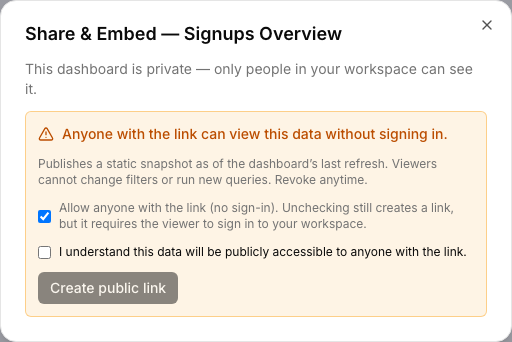
What a public link actually shows
A public link always renders the dashboard’s published snapshot — never a live draft — and always shows each widget’s last cached query result, exactly as it looked the last time that query ran. It never re-executes anything on your behalf: the response is deliberately stripped down to just what’s needed to render (widget layout, visualization type/options, and the cached result data), with no SQL text, no connector configuration, and no other objects’ data leaked alongside it.
Parameters aren’t interactive on a public link
Because a public link always serves the frozen cached result, dashboard-level parameters have no effect there — there’s no input to change a value and no live re-query to change it against. What a public viewer sees is whatever values were in effect the last time each underlying query actually ran. A query built on a Text or Query-based Dropdown parameter shows up on a public link the same as any other — the restriction on those parameter types is about who can run the query in the first place (manage access to its connector), which is a separate question from what a public link, which never runs anything, can show. See Parameters for the full rule.
Expiry
A public link defaults to expiring 90 days after it’s created — there’s no field in the current UI to set a different expiry, so every link made from the Share dialog gets this default. Past its expiry, the link stops resolving, the same not-found response as a revoked one. Create a new link if you still need it live past that point.
Revoking
Revoking immediately invalidates the link — anyone still holding the old URL gets a not-found response, indistinguishable from a link that never existed. Revoking doesn’t affect the dashboard’s public/private setting for creating a new link later; it only kills the specific token that was live.
To cut off whoever holds the current URL while keeping the dashboard shared, revoke the existing link and create a new one.
Where to go next
- Embedding — the iframe-embed sibling of a public link, sharing the same 90-day default expiry, but able to target a single visualization instead of a whole dashboard.
- The permissions model — how a public link bypasses the per-object access layer on purpose, and what it still enforces.