Groups and connector access
Groups are the unit of both permissions and connector visibility. A user’s access is the union
of everything their groups grant — there’s no per-user override outside of group membership.
Managing groups (creating them, adding members, attaching connectors or roles) requires
manage_groups; reading them requires view_groups.
Every organization starts with two builtin groups: admin (every permission, unrestricted
connector access) and default (the Editor role — see
Roles and permissions). Builtin groups can’t be
deleted, but you can still adjust default’s connector assignments and add or remove members.
Restricted vs. unrestricted
Each group has a connector-access posture, toggled independently of its permissions:
- Unrestricted (the default for a new group) — members see and can query every connector in the organization.
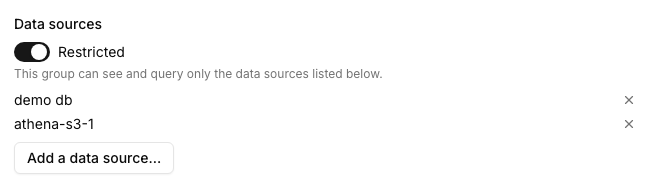
- Restricted — members only see the connectors explicitly assigned to that group.
A user’s visible connectors are the union across all their groups: if any one group they belong to is unrestricted, they see everything, regardless of what other groups they’re in. If all their groups are restricted, they see the union of every group’s allowlist.
[!NOTE] A restricted group with nothing assigned to it grants access to nothing — that’s the safe default when you create a new restricted group before you’ve attached any connectors.
Worked example: analysts and finance
Say you want your analysts team to query the main warehouse, and a smaller finance team to also reach a separate billing replica that the rest of the company shouldn’t see.
- Create a group named Analysts. Leave it unrestricted if everyone at the company should see the warehouse by default, or mark it restricted and assign only the warehouse connector if you want to be explicit about it.
- Create a second group named Finance, mark it restricted, and assign both the warehouse and the billing replica to it.
- Add finance teammates to both Analysts and Finance. Add everyone else to just Analysts.
Now analysts-only members see the warehouse; finance members see the warehouse and the billing replica, because group access is additive — being in a second, more permissive group only ever adds reach, never takes it away.
[!TIP] Attach roles to groups to control what members can do (view vs. edit vs. schedule), and use the restricted/unrestricted toggle plus connector assignment to control which data they can do it to. The two are independent — a group can have broad permissions but a narrow connector allowlist, or the reverse.
Where to go next
- Roles and permissions — what a group’s attached roles actually grant.
- Users — inviting people directly into a group.