Scheduled refresh
A query normally only runs when someone opens it and clicks Execute, or when a viewer loads a dashboard that’s stale. A schedule makes it run on its own, on a cadence you set, so its result stays fresh even when nobody’s looking at it.
Turning on a schedule
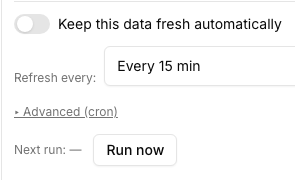
Open the query’s “Refresh schedule” panel and flip the toggle on. Pick a cadence:
- Every 5 / 15 / 30 minutes, or hourly — a fixed interval.
- Daily at HH:MM or Weekly on a chosen day at HH:MM — a specific time of day. The schedule editor has no timezone picker, so a time you set here is UTC — convert yourself when you pick one. The API accepts a timezone if you need a local one; see Manage monitors via the API.
- Advanced (cron) — a raw cron expression, for cadences the presets above don’t cover.
[!NOTE] An Advanced cron expression needs 6 fields: seconds, minutes, hours, day-of-month, month, day-of-week (
0 30 9 * * *for 9:30:00 daily). A standard 5-field crontab expression is rejected — add a leading seconds field (usually0) to any 5-field expression you’re porting in.
[!NOTE] A schedule always runs the query’s published version, never a pending unpublished edit — so a query has to be published at least once before its schedule can be turned on. See Versions, drafts, and publishing for what “published” means here.
When a scheduled run fails
The panel shows each recent run’s outcome, and the next run’s countdown. If a scheduled run keeps failing, arcodash auto-pauses the schedule after 10 consecutive failures rather than retrying forever against a broken query or an unreachable connector — the panel flags this clearly and gives you a Resume button plus a link straight to the failing run’s error, once you’ve fixed the underlying problem.
Parameters on a scheduled run
Nobody’s there to fill in a parameter’s value when a schedule fires — so every parameter on a query that’s on a schedule needs a default value set when you configure it. A scheduled run always uses each parameter’s default; there’s no way for it to prompt for a different value at run time.
[!TIP] If a query genuinely needs different values on different runs (e.g. “yesterday” moving forward each day), set a default that’s itself relative — that logic lives in the SQL, not the schedule.
Schedule vs. a dashboard’s own auto-refresh
A dashboard can also be set to reload itself periodically in the browser — that’s independent of any query’s own schedule, and only refreshes the page a viewer already has open. A query’s own schedule keeps the underlying data current regardless of whether anyone’s viewing a dashboard at all, which matters for anything checked programmatically (an alert, a monitor, an API caller reading the latest cached result). Use a schedule when the data itself needs to stay current; rely on the dashboard’s auto-refresh only for what a viewer sees while a tab is open.
Where to go next
- Parameters — parameter types and their default values.
- Versions, drafts, and publishing — why a schedule needs a published query.
- Core concepts — how monitors differ from a query’s own schedule.