Roles and permissions
A role is a named, reusable set of permissions. A group’s effective permissions are the union of every role attached to it — a group with no role attached grants nothing, and a group can have more than one role attached at once. See Sharing & collaboration: the permissions model for how this combines with per-object sharing on individual queries and dashboards; this page is about the role/group layer that sits underneath it.
Managing roles (creating, editing, attaching to groups) requires manage_roles; reading the role
list requires view_roles or manage_groups — a groups manager needs to see what roles exist to
attach one, even without manage_roles itself.
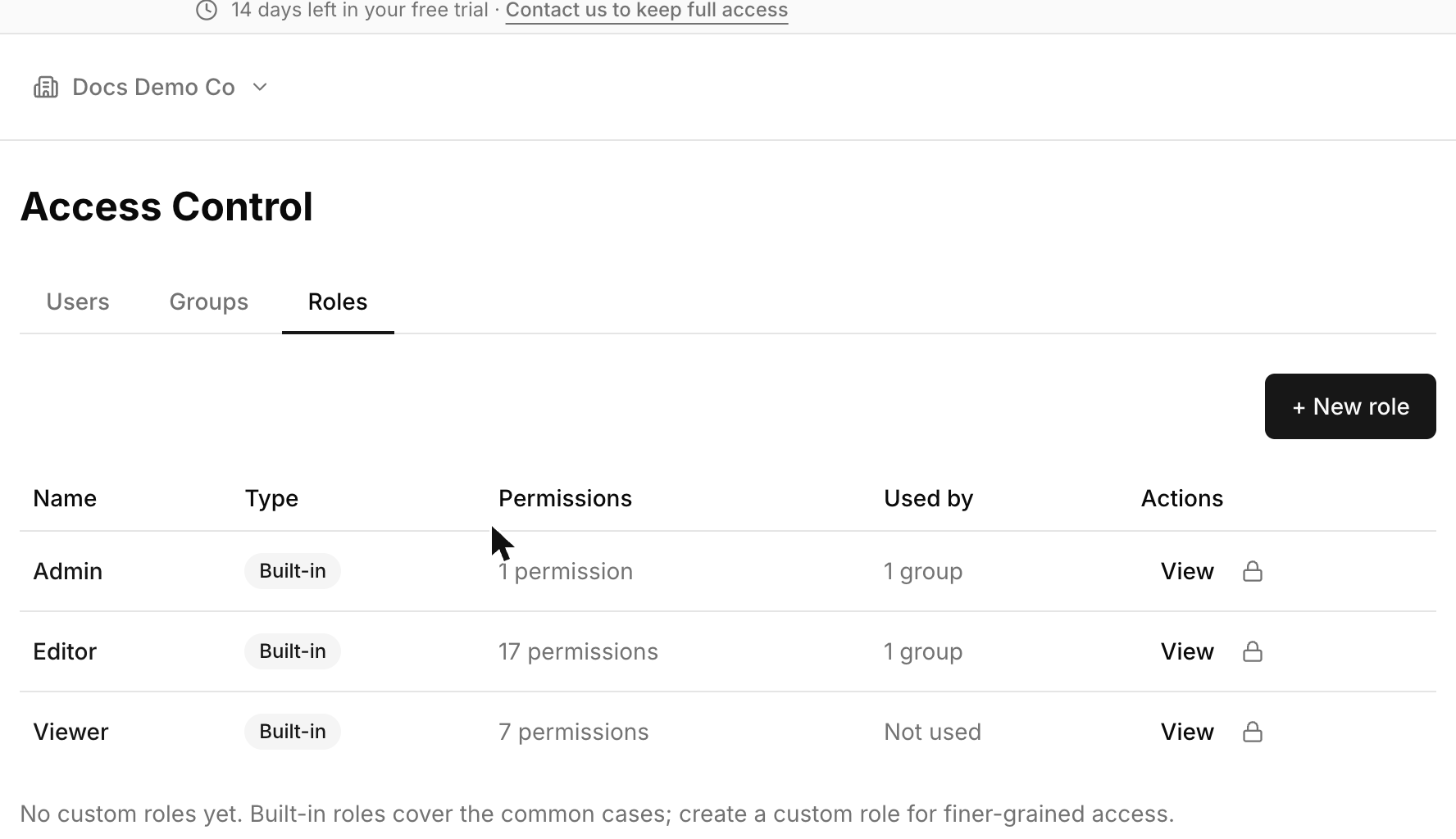
The three builtin roles
Every organization is seeded with three roles that can’t be edited or deleted:
- Admin — a single
adminpermission that implies every other key in the catalog. This is the only way to get full administrative access; there’s no separate “super admin” flag. - Editor — create, edit, and run dashboards, queries, and monitors; view connectors, other users, notification destinations, and snippets; manage snippets; schedule queries; create organization-level shareable links. Excludes creating connectors and managing dashboards/queries/connectors outright — those are admin-tier by default.
- Viewer — read-only, six permissions: view dashboards, queries, connectors, monitors, notification destinations, and snippets.
The builtin admin group is linked to Admin; the builtin default group is linked to Editor; the
builtin viewers group is linked to Viewer.
The permission catalog
Every permission a role can hold comes from a fixed catalog of 31 keys, grouped into: Admin
(user/group/role management), Dashboards, Queries, Connectors, Monitors & Alerts, and Sharing. A
handful of manage_* keys imply a bundle of narrower keys — holding manage_dashboard already
implies view_dashboard, create_dashboard, and edit_dashboard, for example — so you don’t need
to grant each narrow key alongside its manager-level one.
| Key | Category | Allows | Implies |
|---|---|---|---|
admin |
Admin | Every other key in the catalog — the only way to get full administrative access. | Everything below |
view_users |
Admin | View the user list. | |
manage_users |
Admin | Invite, edit, disable, and regenerate the API key of a user. | view_users |
view_groups |
Admin | View groups and their membership. | |
manage_groups |
Admin | Create, edit, and delete groups; manage membership, connector access, and role attachment. | view_groups |
view_roles |
Admin | View the role list. | |
manage_roles |
Admin | Create, edit, delete, and attach roles. | view_roles |
view_dashboard |
Dashboards | View dashboards. | |
create_dashboard |
Dashboards | Create a new dashboard. | |
edit_dashboard |
Dashboards | Edit an existing dashboard’s layout and widgets. | |
manage_dashboard |
Dashboards | Full control over dashboards. | view_dashboard, create_dashboard, edit_dashboard |
view_query |
Queries | View queries. | |
create_query |
Queries | Create a new query. | |
view_snippets |
Queries | View reusable SQL snippets. | |
manage_snippets |
Queries | Create, edit, and delete snippets. | view_snippets |
edit_query |
Queries | Edit an existing query’s SQL, parameters, or visualizations. | |
execute_query |
Queries | Run a query against its connector. | |
schedule_query |
Queries | Turn on or change a query’s refresh schedule. | |
manage_query |
Queries | Full control over queries. | view_query, create_query, edit_query, execute_query, schedule_query |
view_data_source |
Connectors | View connectors. | |
create_data_source |
Connectors | Create a new connector. | |
edit_data_source |
Connectors | Edit an existing connector’s connection details. | |
manage_data_source |
Connectors | Full control over connectors. | view_data_source, create_data_source, edit_data_source |
view_monitor |
Monitors & Alerts | View monitors. | |
create_monitor |
Monitors & Alerts | Create a new monitor. | |
edit_monitor |
Monitors & Alerts | Edit an existing monitor’s condition or schedule. | |
manage_monitor |
Monitors & Alerts | Full control over monitors. | view_monitor, create_monitor, edit_monitor |
view_destinations |
Monitors & Alerts | View notification destinations (with secrets stripped). | |
manage_destinations |
Monitors & Alerts | Create, edit, and delete notification destinations. | view_destinations |
create_embed |
Sharing | Create organization-shareable links (visible to signed-in org members, or via a signed token). | |
share_public_anonymous |
Sharing | Marks a link as not requiring sign-in. Inert on Cloud — see below. |
Sharing has two graded keys worth calling out specifically:
create_embed— organization-shareable links (visible to signed-in org members, or via a signed token). Included in Editor by default.share_public_anonymous— withheld from every builtin non-admin role. It grants nothing on Cloud: every share link and embed requires the viewer to be a signed-in member of the organization regardless of this permission, so granting it changes nothing a viewer can do.
Creating a custom role
If the three builtin roles don’t fit — say, a role that can edit queries but not dashboards, or one scoped only to monitors — create a custom role from a name and a list of permission keys (only keys in the catalog are accepted; anything else is rejected). Attach it to one or more groups the same way you’d attach a builtin role. A custom role can be edited or deleted freely, except a role still attached to at least one group can’t be deleted until you detach it.
[!TIP] Attaching more than one role to the same group is additive — a group with both a narrow custom role and Viewer attached gets the union of both, not just the narrower one.
Where to go next
- Groups and connector access — attaching a role is one property of a group; connector scoping is the other.
- Users — putting someone in a group with the right role attached.