Embedding
An embed is the iframe-friendly sibling of a public link:
a token-bearing URL meant to be dropped into an <iframe> on another page, rather than opened
directly in a browser tab. The two share the same underlying mechanism - same read-only
response with no SQL or connector details - but an embed can also target a single
visualization, not just a whole dashboard, and carries its own token separate from the
dashboard’s public-link token.
[!NOTE] Embeds are token links only. There is no signed-embed mode that your own backend issues per viewer; every embed is a bearer-token link, whether it ends up in an iframe or is opened directly.
Creating an embed
From a dashboard or visualization’s Share dialog, create a link. Creating one requires the
create_embed permission. The object being embedded must already be published (a dashboard) or
built on a published query (a visualization) - there’s nothing to serve otherwise.
[!IMPORTANT] An embed requires the viewer to be a signed-in member of your organization, unless its creator holds
share_public_anonymous(admins do) and left Allow anyone with the link (no sign-in) checked, which is the default. Anonymous embeds render for signed-out visitors, so an iframe on a public website works, and anyone with the URL can view it until it expires or is revoked. Uncheck the box to limit the embed to signed-in org members.
What the token grants
The token is a long random bearer secret (not a signed/verifiable token - anyone holding the string can use it, there’s no separate key to check it against). Holding it grants exactly one thing: read-only access to that one object’s last cached result, through the same stripped response a public link serves - no SQL, no connector configuration, no access to any other object. See Public links for what that stripped response does and doesn’t include, and why dashboard parameters have no effect on what an embed shows.
Expiry
An embed carries an expiry timestamp. Unless you set one explicitly through the API, a new embed defaults to 90 days from creation - the Share dialog has no expiry field, so an embed created there always gets that default. Past its expiry, the token stops resolving: the same uniform not-found response as a revoked one, with no automatic renewal. Create a new embed if you still need the link live past its expiry.
Managing active embeds
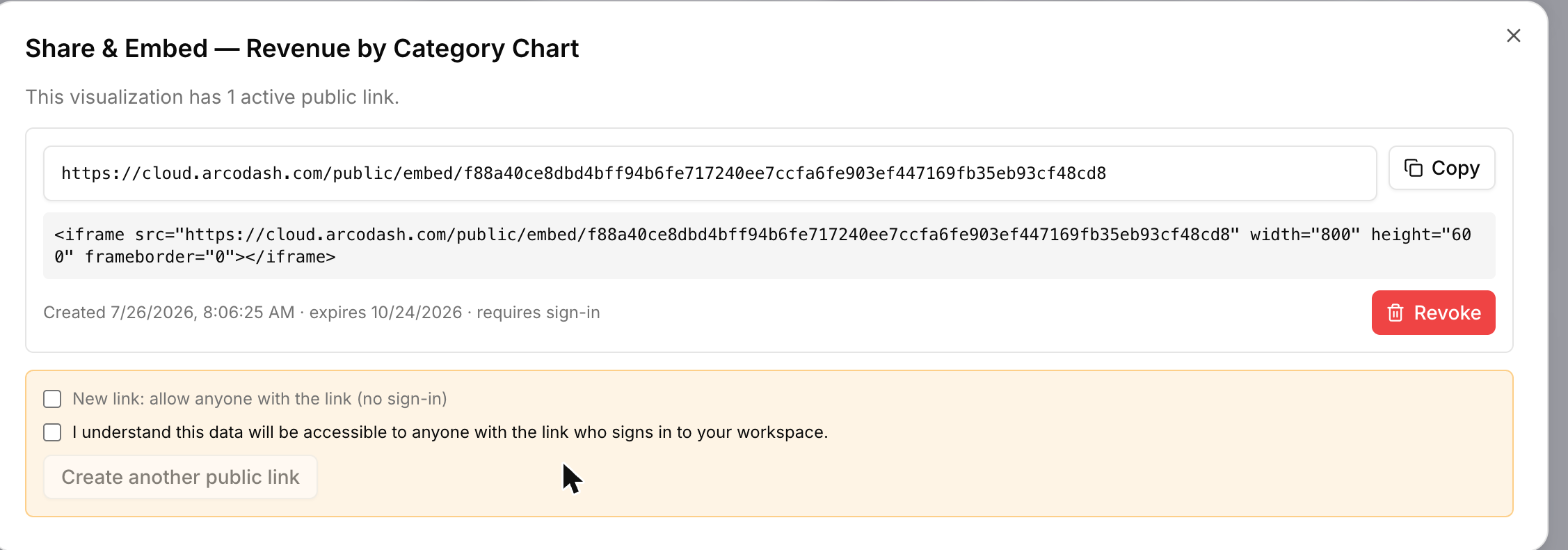
The Share dialog for an object lists every embed created for it, most recent first, showing when it was created, whether it requires sign-in, and its expiry if it has one. A query’s own editor also shows a count of active embeds pointing at it - including ones on a dashboard built from one of its visualizations - as a heads-up before you change something that link depends on.
Revoking
Revoke from the same list. Like a public link, revoking is soft (the row and its history stay, just marked revoked) and immediate: the token stops resolving on the very next request, with no way to un-revoke it - create a new embed if you need another link.
Where to go next
- Public links - the whole-dashboard, non-iframe sibling of this same mechanism.
- The permissions model - how
create_embedfits into the broader permission catalog.